
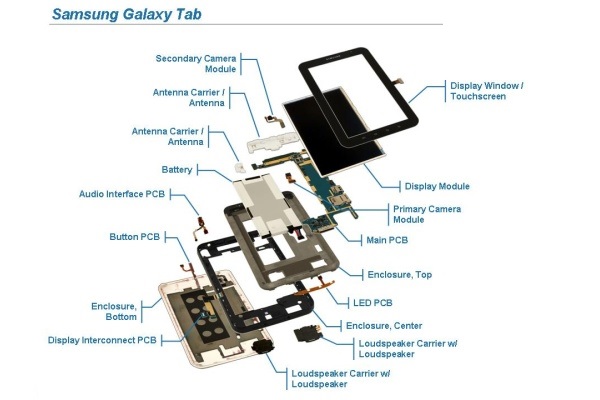
A tablet PC is made up of several essential components or tablet parts that work together to deliver a compact, all-in-one computing experience.
In many ways, a tablet is similar to a traditional computer, but without separate peripherals such as a keyboard, mouse, speakers, or printer.
Instead, tablets integrate everything into a single, slim device, combining hardware, software, and a touch-based interface for portability and ease of use.
What Makes a Tablet Different from a Traditional PC?
Unlike desktop or laptop computers, tablets bring multiple features together in one lightweight unit. Most modern tablets include:
-
A multi-touch screen
-
Integrated speakers
-
Built-in webcam (model-dependent)
-
USB and/or SD card ports (model-dependent)
-
High-resolution display
All of these elements are housed in a single thin body, rather than being spread across a tower, monitor, and external accessories.
Core Tablet Parts and Hardware
The main components that define a tablet’s performance and usability include:
-
RAM (memory)
-
Storage (disk or flash memory)
-
Processor (CPU)
-
Operating system
-
App ecosystem
-
Screen size and display technology
Each of these plays an important role in how the tablet functions day to day.
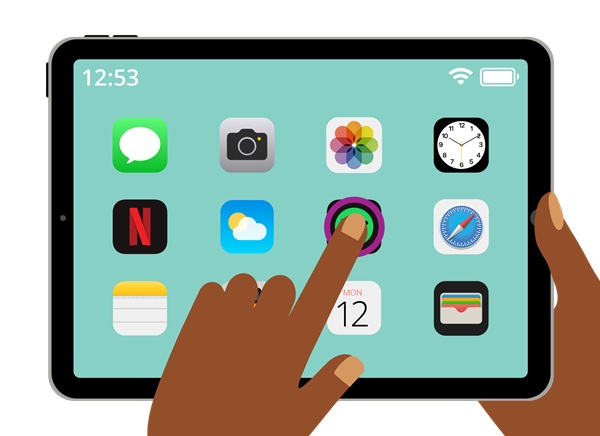
RAM: Tablet Memory Explained
Tablet RAM is responsible for running apps smoothly and handling multitasking. Entry-level tablets may include around 512MB of RAM, while more capable models typically offer 1GB or more.
More RAM allows a tablet to run multiple apps at once, switch between tasks faster, and handle more demanding applications without slowing down.
Tablet Processors and Performance
Tablets use a variety of processors, each designed for efficiency and mobile performance. Common processor types include:
-
x86 Intel processors, similar to traditional PCs
-
ARM-based processors, used in most mobile devices
-
Custom chips, such as Apple’s A-series dual-core processors
Each processor architecture is optimized differently, and performance varies depending on how the tablet’s hardware and software are configured.
Storage Options: Flash Memory and Solid-State Drives
Tablet storage capacities vary widely depending on the model.
Flash Memory Tablets
Some tablets rely on built-in flash memory rather than a full solid-state drive. These models often have limited internal storage but usually include an SD card slot, allowing users to expand storage easily. SD cards commonly range from 4GB up to 64GB or more.
Tablets with Solid-State Storage
Tablets equipped with integrated solid-state drives (SSD) typically offer larger internal storage options, such as:
-
8GB
-
16GB
-
32GB
-
64GB
-
128GB or more
These tablets often still support expandable storage via SD cards or other memory expansion options.
Choosing the right storage size depends on how much data, music, videos, and photos the user plans to keep on the device.
Tablet Operating Systems
The operating system (OS) determines how a tablet functions and which apps it can run. Common tablet operating systems include:
-
Apple iOS (iPad)
-
Android OS
-
Windows Tablet OS
-
BlackBerry OS
Each operating system has its own strengths, interface design, and ecosystem.
Apple iOS Features
Apple’s iOS is known for:
-
Smooth and responsive touch controls
-
Simple and intuitive navigation
-
Fast app launching
-
Strong performance optimization
-
Integrated features such as Siri
These qualities make iOS popular among users who value simplicity and reliability.
Android, Windows, and BlackBerry Operating Systems
The Android operating system, based on Linux, is designed to efficiently utilize RAM and offers greater customization options. While similar to iOS in core functionality, Android differs in menu layouts, icons, and system behavior.
Windows and BlackBerry tablet operating systems also provide smooth performance, responsive interfaces, and unique productivity and customization features. The best choice depends on individual preferences and usage needs.
Tablet Apps and App Marketplaces
App availability varies depending on the tablet’s operating system. Each platform has its own marketplace, such as:
-
Apple App Store
-
Google Play Store
-
Microsoft Store
-
BlackBerry World
Some apps are exclusive to specific platforms, while many developers release their apps across multiple marketplaces to reach a wider audience.
Popular tablet apps include games like Angry Birds, Fruit Ninja, Words with Friends, and FarmVille, along with racing, puzzle, and adventure games.
Beyond games, tablets support a wide range of apps such as:
-
E-book readers
-
Music and radio streaming apps
-
Productivity and organizer tools
-
Daily planners and utilities
Tablet Screen Sizes and Display Technology
Tablet screens come in a variety of sizes, typically ranging from 7 inches to 10 inches or larger, depending on the brand and model.
Display technologies may include:
-
LCD screens with backlighting
-
TFT LCD touch screens
-
LED back-lit multi-touch displays
Screen resolution also varies, with common resolutions including:
-
1280 × 800 pixels
-
1024 × 768 pixels
-
1024 × 600 pixels
Higher resolutions generally provide sharper images and better viewing experiences.
What to Look for When Choosing a Tablet
When selecting a tablet, some key factors to consider include:
-
Screen size and display quality
-
Processor speed and memory
-
Storage capacity and expandability
-
Available apps and operating system
Additional features worth considering are:
-
3G or cellular network compatibility
-
Integrated webcam
-
Device weight and overall size
-
Battery life
- Bluetooth Capability
By evaluating these tablet parts and features together, users can choose a tablet PC that best suits their work, entertainment, and everyday needs.
